
Experience the world in 3D on Google Maps StreetView. Click on the new 3D pegman on any StreetView image. You need special glasses to see it in 3D. Example:
Local copy in case you are viewing this after April 1st…
😀
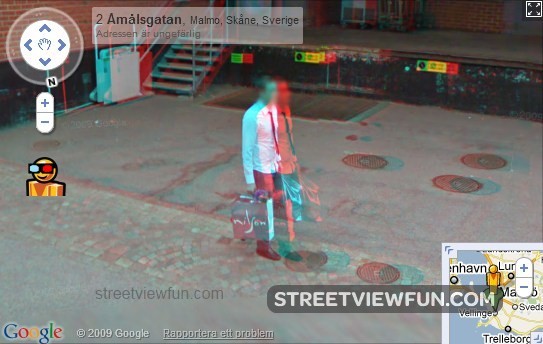
You can still access Street View in 3D by right clicking a street view and select 3d mode.
Similar Street View images
 Top 100 Google Maps Street View updated!
 Google Street View Driver
 Google Street View catches attempted robbery LIVE in the city of Londrina
 Google Maps Wrapped Street View
 When you find the Bing Maps Car on Google Street View 3 Times
Windows blue screen at Google Maps Street View
When you find the Bing Maps Car on Google Street View 3 Times
Windows blue screen at Google Maps Street View
 1972 Olympic Stadium in Munich on Google Maps Street View
 2 google maps street view cars taking photos of eachother
 Celebrating the arrival of Google Maps Street View car
that’s really great if works! unfortunately i don’t have special glass now. let’s make virtual glasses to spread virtualisation in the world! 😀
It seems to be only for today as a “joke” but it’s actually working and is so good. They should keep it. I love this!
Link to download glasses?
it still works
Spiker, you can’t download it … it’s a concrete item. 😛
I tried it with my glasses and it barely works ! Not perfect in some places but it is a real good deal anyway !
Too bad they removed it now 🙁
Yeah, 3D seems to be gone now 🙁
One sugguestion is that it is because it caused a problem with the Zoom of Google Maps API
I bought some very cheap 3d glasses especially…. it sort-of worked (on a large TV) but often only half the picture had a 3d effect, very strange…. and there were a lot of errors in the rendering of the 3d image… but it was still awesome! C’mon Google bring it back!! 😛
i know how to get 3d back u right click on picture and it says 3d on do the same to turn it off
3D is working. You right click and pick 3D mode. Maybe the coloured eyglass head was to make people notice quickly.
They have not removed it you can still access it by right clicking any streetview picture and pressing 3d mode on
It is still availble u have to right click then u will find it
3D is working. You right click and pick 3D mode. Maybe the coloured eyglass head was to make people notice quickly.